Kenya Built for SHA, M-Pesa and KRA eTIMS

The hospital management system built for Kenyan health care

Run the whole patient visit in one place: registration, triage, consultation, lab, pharmacy, billing and the SHA claim. Every service becomes a charge automatically, so nothing goes unbilled.

  • Runs in the browser on the PCs you have
  • Level 2 to Level 4 facilities
  • Built to the Data Protection Act
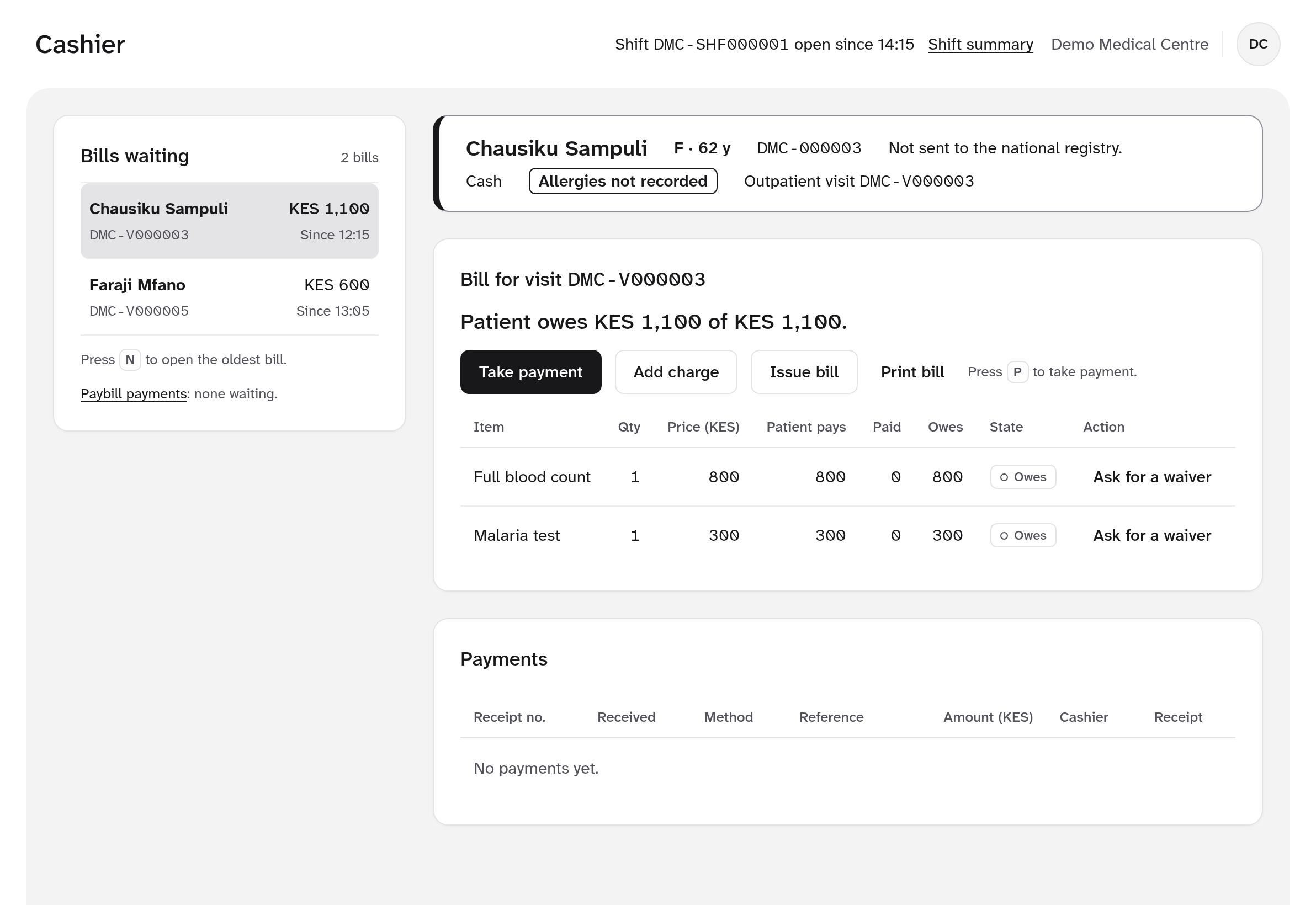
The cashier screen: bills waiting, the patient banner, and a bill with a full blood count and malaria test ready for payment
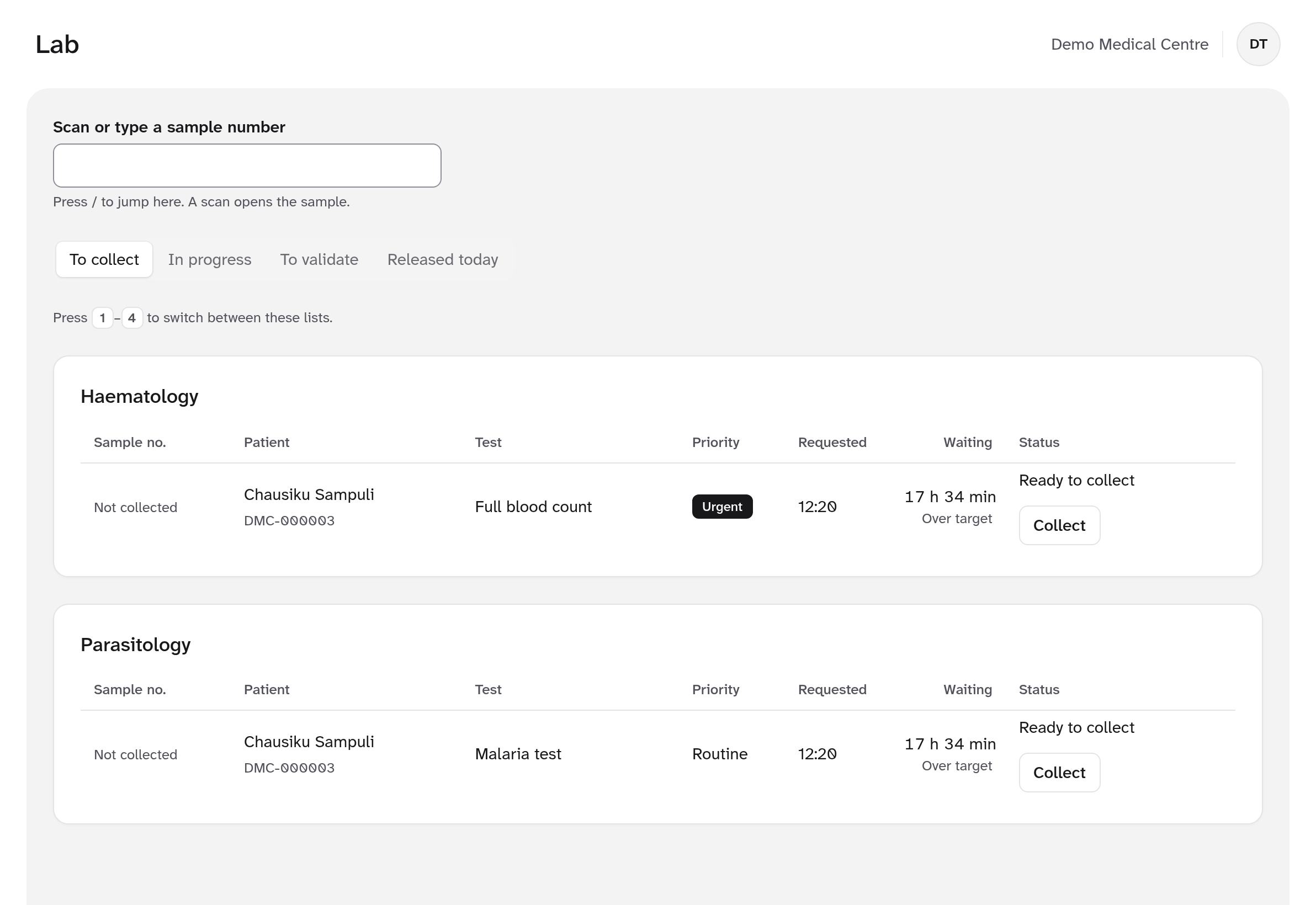
Lab worklist by department
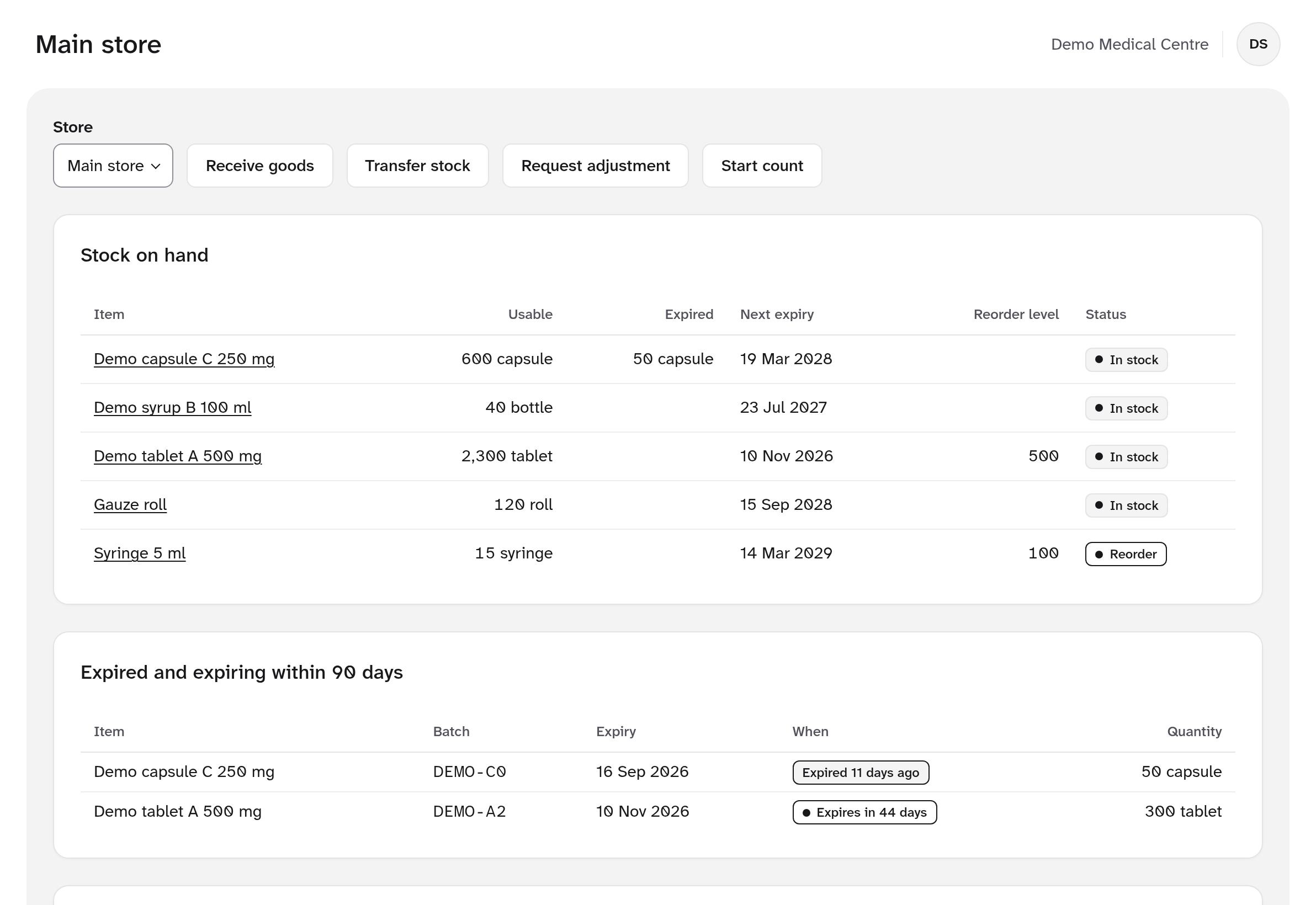
Stock with expiry and reorder alerts

Built to work with Kenya's health and payment systems

  • SHA through the HIE
  • M-Pesa
  • KRA eTIMS
  • Client Registry
  • ICD-11
  • MOH reports
  • FHIR R4

Why facilities switch

Paper registers and separate systems cost you money every day

Services that never reach the bill

A test is done, a drug is dispensed, but nobody adds the charge. Here every confirmed order, dispense and procedure creates its charge automatically.

SHA claims that come back rejected

Missing codes, a lapsed licence or no pre-authorisation. Claims are checked before they are sent, and rejections land in a work queue with the reason.

Stock that expires on the shelf

Dispensing takes the batch that expires first, and the store sees what expires in the next 90 days and what needs reordering.

One system, one visit

From the front desk to the claim, without paper

Every step works on the same visit record, so the next person sees what the last one did, and the bill builds itself as the patient moves through.

  1. RegisterSearch by ID or phone, catch duplicates, add dependants.
  2. Check inOpen the visit, check SHA eligibility, join the queue.
  3. TriageVitals with safe limits and flags for abnormal values.
  4. ConsultNotes, ICD-11 diagnoses, orders and prescriptions.
  5. Lab and pharmacyBarcoded samples, results, and dispensing by expiry.
  6. PayCash or M-Pesa, with an eTIMS receipt.
  7. ClaimThe SHA claim is built from the visit, sent and tracked.

Features

Everything a Kenyan facility runs on, in one place

Front desk and queues that move

Find returning patients in seconds, register new ones with duplicate checks, and send them to the right queue. Clinicians call the next patient with one key.

  • Search by name, phone, national ID or patient number
  • Priority flags and a waiting-area display with ticket numbers only
  • Dependants and next of kin on the same record
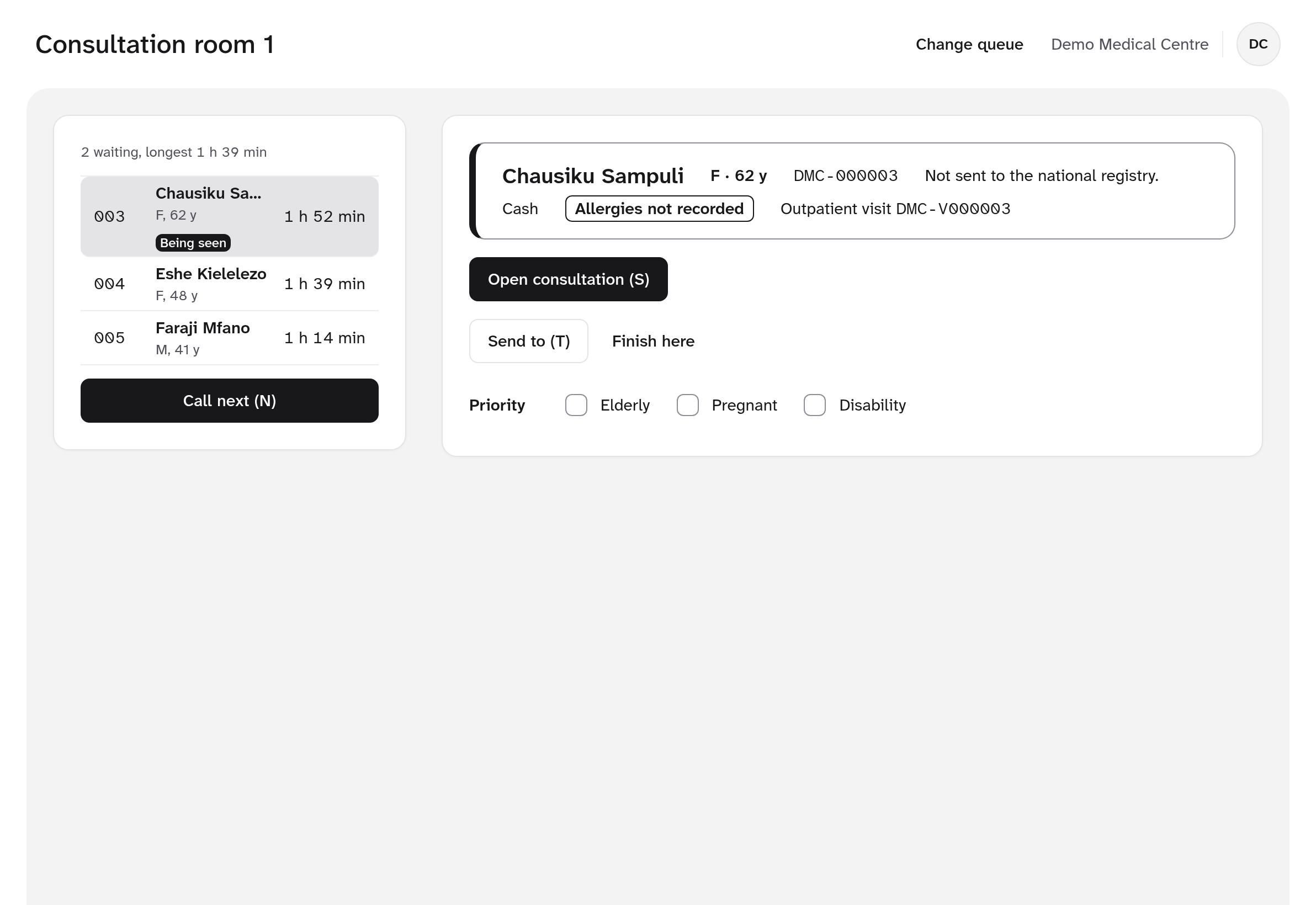
Registration and queues
A consultation room queue with waiting times and the patient being seen

Electronic medical records clinicians want to use

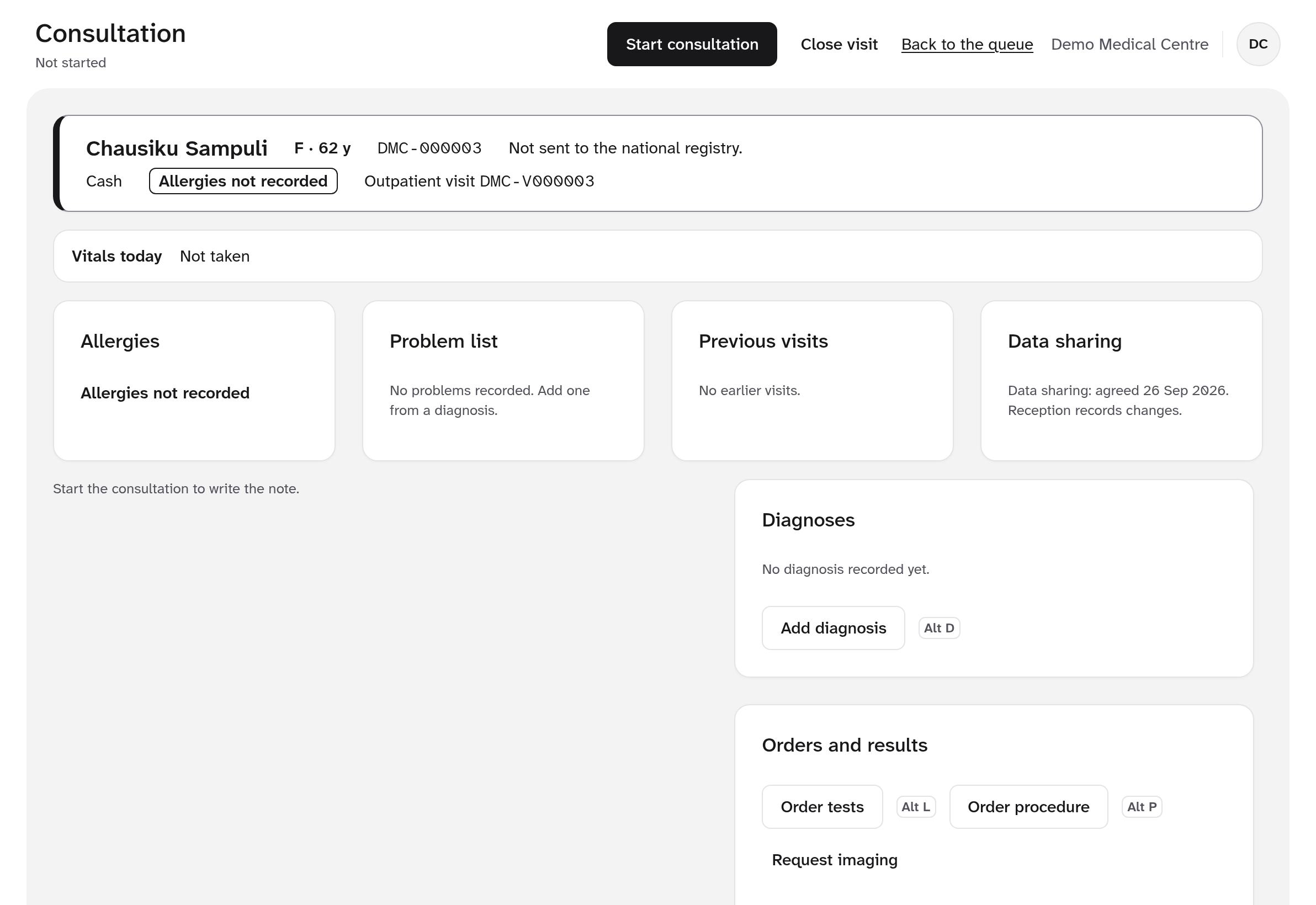
The consultation workspace puts allergies, problems, previous visits, vitals and orders on one screen, with keyboard shortcuts for every frequent action.

  • Allergies always shown: listed, none known, or not recorded
  • ICD-11 diagnoses, lab and procedure orders, sick sheets and referrals
  • Prescribing checks for allergies, duplicates and maximum doses
Medical records
The consultation workspace with the patient banner, allergies, problem list, previous visits, diagnoses and orders

A lab that knows what is urgent

Orders arrive from the consultation with priority, grouped by department. Scan a barcode to open a sample, enter results, validate and release.

  • Barcode labels and a pay-or-approve gate before collection
  • Results checked against reference ranges, with a second person validating
  • Critical values alert the ordering clinician, who must acknowledge
Laboratory
The lab worklist grouped into haematology and parasitology, with urgent samples marked

Pharmacy and stores you can trust

Stock is a ledger: every receipt, transfer, sale and count is a movement you can trace, and balances can never go negative.

  • Dispensing by earliest expiry, with labels and returns
  • Goods received, transfers between stores and blind stock counts
  • Adjustments need a second person to approve
Pharmacy and stores
Stock on hand in the main store, with expiring batches and items to reorder

Who it's for

Made for the facilities that serve most Kenyans

Clinics and dispensaries

Level 2. Registration, consultation, a small pharmacy and cash or M-Pesa.

Health centres

Level 3. Add a lab, queues across departments, SHA claims and MOH returns.

Hospitals

Level 4. Several stores, cashier shifts, approvals, insurers and inpatient care.

Faith-based facilities

Waivers with approval, sensitive records protected, and one standard across sites.

Built for real conditions

Fast at the counter, safe in the clinic

No installsRuns in the browser on the computers you already have, down to 1366 × 768 screens.
Keyboard firstEvery frequent action has a shortcut. Ctrl K finds any patient.
Keeps workingTriage and notes are saved on the device when the internet drops.
Every change auditedWho did what, and when, in a log that cannot be edited.

Data protection

Patient data handled the way Kenyan law expects

Designed around the Data Protection Act 2019 and the Digital Health Agency's requirements. We are working towards DHA certification.

Access by role

Staff see what their job needs. Sensitive records need extra permission, and emergency access asks for a reason.

Nothing quietly deleted

Clinical records are corrected, never erased, and the history stays visible. Reads of patient charts are logged.

Consent recorded

Data-sharing consent is recorded, can be withdrawn with a reason, and is checked before national registry and SHA calls.

Pricing

One price per facility, every module included

All modules and unlimited users on every plan, with updates and support. A one-time setup fee of KES 10,000 per facility covers getting you started.

See pricing
  • Monthly KES 2,500 per month
  • Yearly KES 25,000 per year
  • 2 years KES 45,000 for 2 years Save KES 15,000

Questions

Questions facilities ask us

Does hospital.or.ke work with SHA claims?

Yes. It is built for SHA eligibility checks, pre-authorisation and claims through the national Health Information Exchange, using the official AfyaLink APIs. It is being tested against test services now and goes live after Digital Health Agency onboarding.

Can patients pay with M-Pesa?

Yes. The cashier can send an M-Pesa payment prompt to the patient's phone, and payments to your paybill are matched to the right bill automatically. The money goes straight to your facility's own paybill or till.

Does it issue KRA eTIMS receipts?

It is built to sign every receipt, invoice and credit note through KRA eTIMS (OSCU) and print the fields KRA requires. The live connection follows testing on KRA's sandbox.

What happens when the internet goes down?

Triage and consultation notes are kept as drafts on the device and sent when the connection returns. Payments, orders and dispensing wait for the connection, so money and stock are never counted twice.

Can we bring our existing records?

Yes. There are importers for patients, price lists and opening stock balances, with a preview and duplicate checks before anything is saved.

Is it ready to use today?

The outpatient system is built and in testing. Inpatient care, appointments, procurement and insurer claims are being built now. Contact us to see a demo or to talk about a pilot at your facility.

See it with your own workflow

Book a demo and we'll walk through a full patient visit, from registration to payment and the SHA claim, using your facility's services and prices.